BaseOS

Build

  • DevelopmentFrom request to a tested pull request.
  • FactoryFrom idea to a live product, stage by stage.
  • Product SuiteRoadmap, changelog and wiki.

Sell

  • Marketing SuiteCampaigns, flows, landing pages and ads.
  • Sales SuiteCRM, pipeline, proposals and inbox.

Run

  • ProjectsTasks, hours and team capacity.
  • Support SuiteHelpdesk, portal and widget.
  • Finance SuiteInvoices, contracts and KPIs.

Automate

The foundation under every pillar.

  • AI agentsAgents that do each area's work — and ask for your OK on what's sensitive.

By industry

  • SaaSSupport, roadmap and changelog for your product.
  • Software housesFrom proposal to invoice, with hours and contracts.
  • AgenciesYour clients’ campaigns, content and ads.
  • ConsultanciesFrom quote request to invoice, with agents on sales.

By team

  • SalesA pipeline that moves itself.
  • MarketingCampaigns and automated flows.
  • Support & CSEvery customer looked after.
  • OperationsProjects and delivery on time.
  • FinanceCollections and cash flow.

By channel

  • WhatsAppMeta's official API.
  • InstagramDMs in the same inbox.
  • EmailGmail and company inboxes.
  • Website chatA widget with your agent.
  • Customer portalTickets and documents.

By use case

  • Qualify leadsThe SDR answers and books.
  • Launch a campaignPage, form and flow in one ask.
  • Proposal → project → invoiceNo typing anything twice.
  • Collect overdue invoicesReminders with your OK.
  • Answer ticketsGrounded in your wiki.
See all use cases →
Pricing
Sign inStart free

Agentic OS

Run yourcompany withagents.

AI agents that know your business and do real work — from a lead's first message to collecting the invoice.

Start free →Watch an agent work
750+

actions your agents carry out in BaseOS — not just replies.

A family having breakfast with the laptop closed on the table

Agents at work

  • FinanceInvoice collected

14-day trial · No card · Then the free plan

§01Monday, 9:07

You started a company.Now you're its sales, support and finance team.

On a small team, whoever delivers also answers leads, handles clients and chases invoices — in tools that don't talk to each other.

CCRM — Opportunities
Xprospect-list.xlsx
WProposal_v3_FINAL_really.docx
•(14) WhatsApp
?Helpdesk — Ticket queue
$Online banking
▦Task board
+
  1. 08h40

    A lead wrote on WhatsApp on Saturday. You'll reply today — if you remember.

  2. 09h30

    A client asks the same question for the fourth time this week. The answer is in the wiki.

  3. 11h10

    Thursday's meeting follow-up got pushed to later. Later is now two weeks.

  4. 14h30

    An urgent ticket has had no owner since Friday. Nobody saw it — it was in the other tab.

  5. 17h50

    Someone asks whether the Acme invoice went out. You search your inbox to be sure.

Your sales and support team can be made of agents.

And you go back to what only you do: delivering and deciding.

What they do from day one

  • Prospecting

    Researches companies that fit your profile and drafts the outreach. The sequence goes out with your OK.

  • Sales replies

    Answers the lead on WhatsApp and site chat within minutes, qualifies them and books the meeting.

  • Follow-up

    Picks every opportunity back up on the right day and logs it all in the CRM.

  • Support

    Answers on WhatsApp, e-mail and chat, with your wiki and the client's history at hand, and calls you in when needed.

  • Collections

    Finds overdue invoices and collects them with your OK.

Later, the same agents take on the rest of the company — on the same base.

See it for your kind of business →
§02One base, many agents

One client, many agents.You only approve what matters.

BaseOS agents don't work in silos: they read and write the same base and hand work to each other — from lead to first invoice. You step in where the decision is yours.

P

Pavio

One base · every module

Source“SaaS Q4” campaign
CRMQualified · decides in December
Quote$4,800/mo · accepted
ContractSigned · 12 months
SupportOnboarding open · portal live
InvoiceSent · approved by you
Julia
Alex
LunaFinance
Sara
#pavio+ you
  1. JuliaMarketing

    New lead from the campaign: Pavio, a logistics SaaS with 40 people. @Alex, it's yours.

    create_lead
  2. AlexSales

    Talked to the founder on WhatsApp. Budget is there, wants to start in December.

    update_lead
  3. AlexSales

    Quote sent with your OK — and accepted! @Luna, can you take contract and billing?

    send_quote
  4. LunaFinance

    Contract drafted from the quote. It went out for signature with your OK and came back signed. @Sara, new client from Monday.

    send_contract_for_signature
  5. ?

    SaraSupport

    Onboarding is open and the client portal is live.

    create_ticket
  6. LunaFinance

    First invoice is ready. Sending waits for your OK.

    create_invoice
  7. You

    Approved.

  8. LunaFinance

    Sent to Pavio's billing contact. Reminder set for the due date.

    send_crm_email
  • 135sensitive actions always wait for you
  • 750+real tools
  • 6specialist agents

Meet BOS. Every BaseOS agent is one, in its own colour.

Real tool names. Fictional data.

§03Why one foundation

Work crosses the whole company.So do your agents.

In BaseOS, sales, projects, support and finance read from the same foundation — and the agents work on top of it.

Sales doesn't work cut off from finance. Support doesn't rediscover the customer's history. And an accepted quote becomes a project and an invoice without anyone retyping the scope.

From lead to meeting

  1. A lead comes in on WhatsApp or the website chat.
  2. The sales agent qualifies it against your criteria.
  3. It logs the conversation in the CRM and schedules the follow-up.
  4. It proposes times and books the meeting.
  5. You step in to negotiate.
The upshot

The follow-up goes out on the right day, without relying on anyone's memory.
From quote to invoice

  1. The client accepts the quote through the link.
  2. The project is created from the quote's data.
  3. The invoice comes from the same quote, with a payment link.
  4. When the client pays, the invoice is marked paid on its own.
The upshot

Nobody retypes the scope — and nobody has to ask whether the invoice went out.

From ticket to solution

  1. The customer writes in through the portal, email or WhatsApp.
  2. The support agent looks for the answer in your wiki.
  3. If it's there, it replies and resolves the ticket.
  4. If it isn't, it routes the ticket to the right department, history included.
The upshot

No ticket left sitting without an owner since Friday.

§04Agents by area

An agent for every part of the company.

Start with the area that hurts most. The others come in when it makes sense — and they already see what the first ones did.

  • Alex · Sales

    More meetings. Less manual follow-up.

    • Qualifies leads on WhatsApp and your website
    • Follows up on the right day
    • Books meetings on your calendar
    • Logs everything in the CRM
    Sales agents →
  • Julia · Marketing

    From campaign idea to a ready flow.

    • Builds the right segment from your base
    • Leaves the email flow as a draft
    • Plans the campaign with your data
    • Publishing and sending stay with you
    Marketing agents →
  • Sara · Support

    From answering a question to resolving a ticket.

    • Answers on WhatsApp, email and chat
    • Replies from your wiki
    • Opens and resolves tickets
    • Calls in a human when needed
    Support agents →
  • Luna · Finance

    No overdue invoice forgotten.

    • Finds the overdue invoices
    • Checks each client's contact and contract
    • Sends the reminder with your OK
    • Leaves the next follow-up scheduled
    Finance agents →
  • Marco · Projects

    For you and your team.

    • Creates tasks and projects
    • Sums up the day and what's pending
    • Searches the whole company
    Projects and tasks →
  • Made-to-measure agent

    750+ tools: build the agent your operation needs.

    Pick the tools, connect other systems via MCP and decide, tool by tool, what it does on its own and what waits for your OK.

    • Tools of your choice
    • MCP connections
    • Per-tool permissions
    • Adjustable autonomy
    Create my agent →
§05How you start

Three steps. At your pace, without stopping anything.

  1. 01 · One foundation

    Start with the area that hurts most.

    Sales, projects, support or finance. The others come in whenever you want — already seeing the data from the ones before.

    • Clients and leads from a CSV spreadsheet
    • Bank statements as CSV or OFX
  2. 02 · Integrations

    Connect where your customers already are.

    The WhatsApp conversation lands in the customer's history, and an email becomes a ticket or a CRM record — without anyone copying anything.

    • WhatsApp through Meta's official API
    • Gmail, Google Calendar and GitHub
    • Webhooks and a REST API for the rest
  3. 03 · Agents

    Put the agents to work.

    Pick the area's agent, the tools it uses and what needs your OK. Then widen its autonomy at your own pace.

    • One agent per area, or your own, made to measure
    • Start small, delegate more as trust grows
§06Autonomy and control

You decide how much to delegate.

Each agent reaches the tools you gave it — and nothing else. Tool by tool, you choose what it does on its own and what waits for your OK.

  • Look up

    Reads what you allowed and brings back the answer: the pipeline, the tickets, the invoices.

  • Prepare

    Gets the work ready for you to review: the email, the flow, the reminder.

  • Act

    Does on its own what you authorized: replying, recording, creating the task.

  • OK?

    Ask for your OK

    Applies at every level. For the actions you mark, the agent shows what it's about to do and waits.

Always wait for a human
  • Issuing an invoice
  • Making changes in finance
  • Sending a contract for signature
  • Publishing a page

That's 135 sensitive actions in all. No autonomy rule takes your approval away from them.

Autonomy isn't losing control.It's choosing what to delegate, what to review and what stays with you.

And underneath it all

Role-based access

Each person on the team sees and changes what their role allows.

Tools per agent

An agent only reaches the tools you gave it. Everything else doesn't exist for it.

Audit trail

Every tool an agent uses is logged: which one, when and with what result.

Isolated data

Each organization's data is kept apart from every other organization's.

Free to leave

Each area exports to CSV, and the REST API moves your data to another system. No exit fee.

Data protection (LGPD), privacy and the details of each control are documented.

See security and privacy →
§07Built for companies with a team

Installing an agent is not an operating system.An agent with access to everything serves one person. A team needs a base.

An assistant wired to WhatsApp, e-mail and the ERP makes a great demo. With thirty people talking to it, the questions change: who asked, on whose behalf, who can approve, where the official record lives. None of them is solved by a system prompt.

The questionAn agent installed on a serverBaseOS
Who is whoOne agent, one credential that reaches everything, and the whole team talking to it.Every person has a role. Every agent is a team member with its own identity and only the tools you gave it.
Where the data livesIn the agent's memory and in files on the server.In the CRM, finance, projects and tickets. The agent works the records; the base is the source of truth.
Who authorizesA line in the prompt asking it not to.Sensitive actions stop and wait for someone on the team to say OK. Who approved is recorded.
What gets recordedThe chat history, for as long as it exists.Every tool an agent used, when, with what result and on whose behalf.
IsolationOne server, gateway or operating-system user per person or per client.Each organization's data is kept apart in every query. One team, many agents, the same base.
Swapping the agentMeans starting over: the memory and the rules lived in it.Change each agent's model, or connect your own assistant over MCP with access tied to one person and one organization. The company stays the same.
The test

If you swap the model or the agent tomorrow, does the company keep running?

  • The data stays intact

    Clients, invoices and projects live in the base, not in the chat.

  • Permissions still hold

    Roles and per-agent tools belong to the platform, not to the model.

  • Processes keep running

    Workflows, approvals and tasks don't depend on which agent is on.

  • Everything stays auditable

    The record of what was done stays with the company.

The agent should be replaceable.Your company's infrastructure should not.

§08No mockups

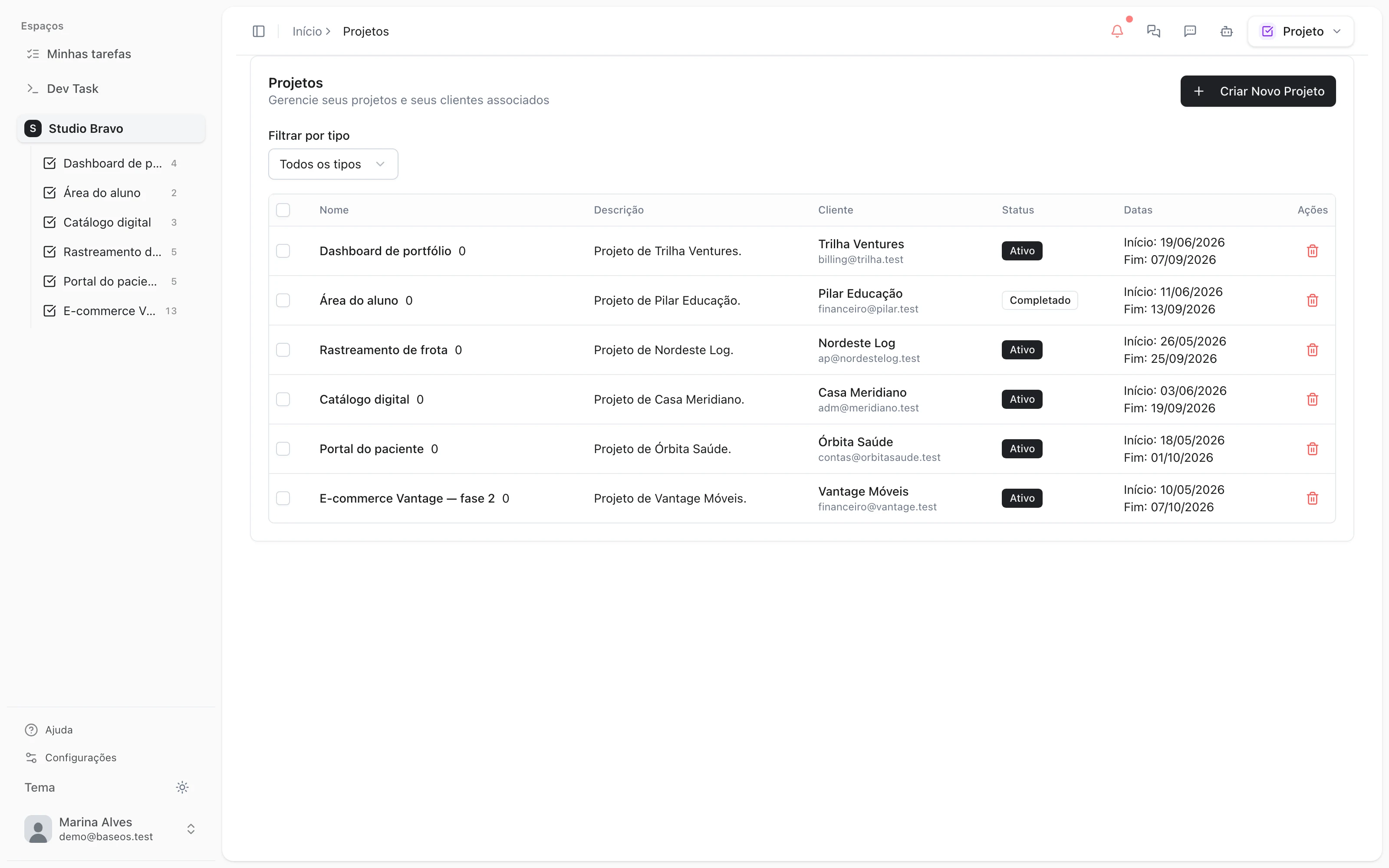
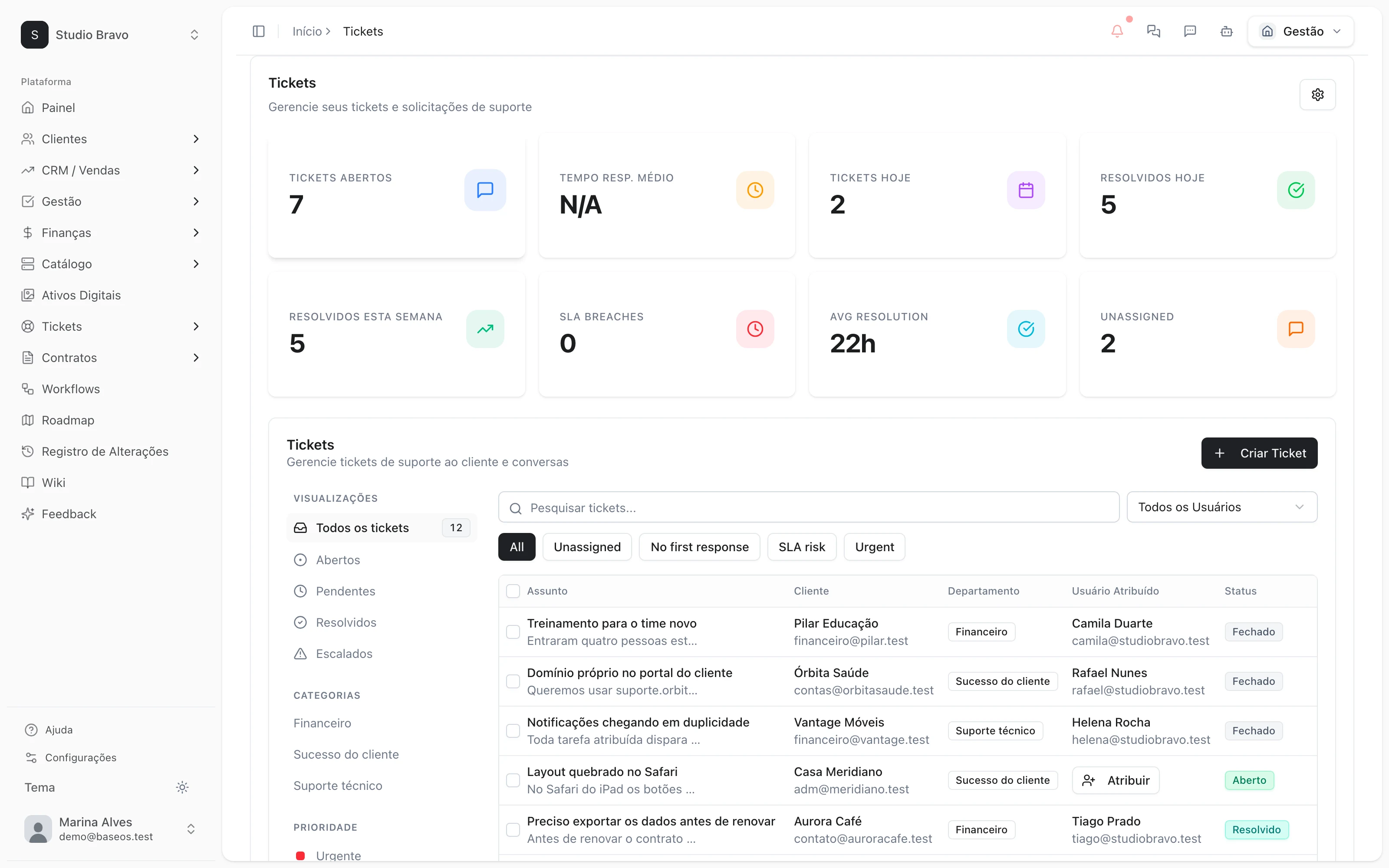
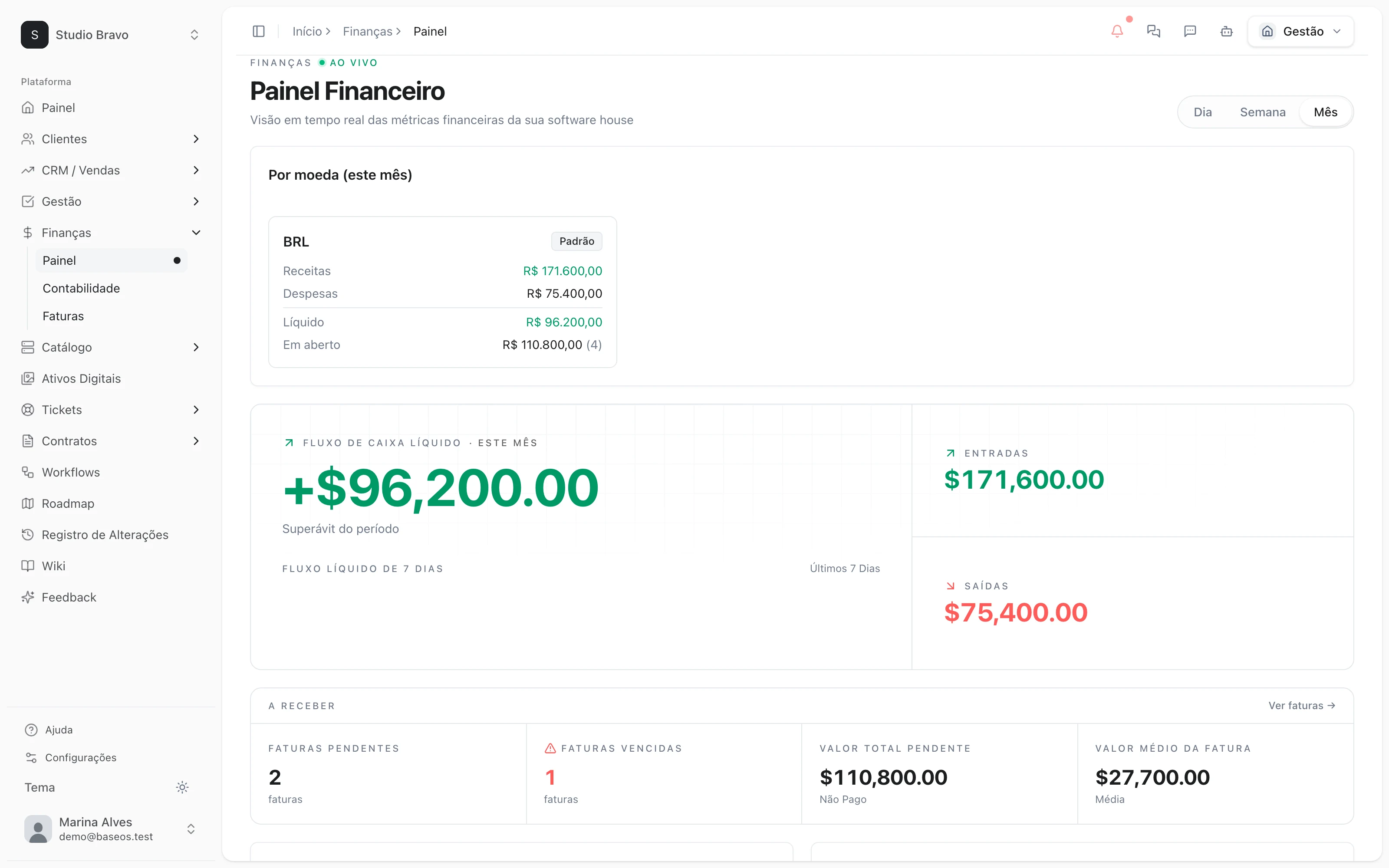
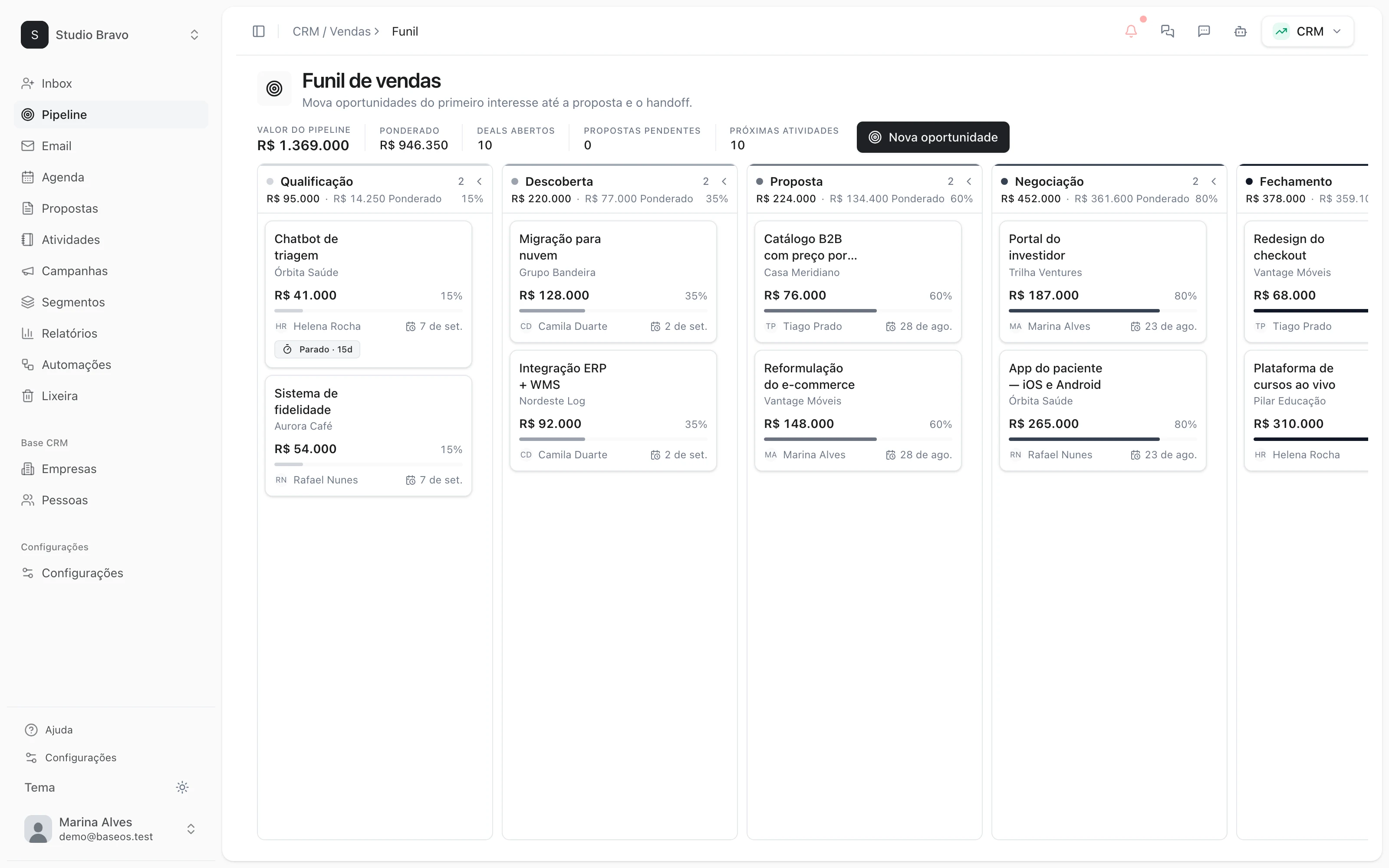
This is the product.Not an illustration.

Real BaseOS screens running Studio Bravo, a demo software house. The data is made up; the screens aren't.

baseos.io/home/crm/pipeline
BaseOS sales pipeline with opportunities across five stages
Sales · Pipeline
baseos.io/home/projects
BaseOS project list with progress and owners
Projects
baseos.io/home/tickets
BaseOS support ticket queue
Support · Tickets
baseos.io/home/finance
BaseOS finance dashboard with revenue and expenses
Finance
Why we built BaseOS

“I spent years running a software house on ten tools that didn't talk to each other. I was the human integration layer — and it was consuming me. BaseOS is the system I wanted to have: the whole operation in one place, with AI by my side, so I could get back to building instead of just holding everything up.”

Founder · BaseOSwe lived the chaos BaseOS fixes

The founding beta is open.

Join now and you get a say in what gets prioritized. BaseOS grows around what companies like yours need — not a roadmap written far away from them.

Join the beta →
§09How billing works

Start free.Expand when you need to.

Try everything for 14 days in your first organization, no card. If you don't subscribe, you stay on the free plan with your data. No lock-in, no cancellation fee.

3 people · monthly list prices · outside Brazil, in US dollars

JobThemBaseOS
  • CRM and sales pipelineHubSpot Sales Hub Starter · 3 users
    $20 × 3 =$60
    CRM & Sales · Basic+$6
  • Team WhatsApp inboxrespond.io Starter · WhatsApp fees extra
    $99
    Omnichannel Inbox · Basic+$10
  • Helpdesk with SLAsZendesk Suite Professional · 3 users
    $149 × 3 =$447
    Tickets · Pro+$14
  • Landing pages and emailMailchimp Standard · up to 500 contacts
    $20
    Marketing · Pro+$18
  • Proposals accepted onlinePandaDoc Starter · 3 users
    $35 × 3 =$105
    Client quotes & reports · Basic+$6
  • Contracts with e-signatureDocuSign Standard · 1 user
    $45
    Contracts · Basic+$6
  • Invoicing and accountingQuickBooks Online Essentials · up to 3 users
    $85
    Finance · Pro+$18
  • Projects and tasksAsana Starter · 3 users
    $13.49 × 3 =$40.47
    Projects & Tasks · Basic+$8
  • Users beyond the 2 included
    $3 × 1 =+$3
The stack
BaseOS
Separate tools
$901.47/mo
BaseOS
$89/mo
Difference
$812.47/mo$9,749.64 over 12 months

Monthly list prices, no promotions, checked on November 6, 2026 on each vendor's own page (outside Brazil, in US dollars). Today's prices and the tools you need may differ. Each row compares the job, not the feature list: no module is an exact copy of another product. Taxes and usage fees — WhatsApp messages, sends, AI — are left out on both sides.

Sources
  • HubSpot Sales Hub Starter
  • respond.io Starter
  • Zendesk Suite Professional
  • Mailchimp Standard
  • PandaDoc Starter
  • DocuSign Standard
  • QuickBooks Online Essentials
  • Asana Starter
See the full bill →
Start free →

No credit card. You build the subscription later, one module at a time, when you need it.

§10Before you ask

No fine print.

What is BaseOS, really? A CRM? An ERP?

It's your company's operating system: sales, projects, support and finance on one foundation, with AI agents working on top of it. It does the job of the CRM, the helpdesk, project management and finance — and they all read the same data.

Do the agents actually do the work?

Yes. They look up data, answer customers, create tasks, log in the CRM and send emails — with the tools you gave each one.

Will the AI agents mess up my data?

They follow the permissions you set. And 135 actions — issuing an invoice, making changes in finance, sending a contract for signature, publishing a page — always wait for a human, whatever the agent's automation level.

How long does it take to get started?

Minutes. At sign-up you pick your type of company and the right modules come switched on — you can even load a sample workspace and delete it later. From there, you bring in one area at a time.

Do I have to migrate everything at once?

No. Bring one area at a time. Clients and leads come in from a CSV spreadsheet, bank statements as CSV or OFX, and if you're coming from WHMCS you can import clients, orders and tickets. If you'd rather have a hand, book a walkthrough. Book a walkthrough →

Can my clients pay their invoices online?

Yes. Connect your Stripe account and every invoice gets a payment link — and when your client pays, the invoice is marked paid on its own. For clients in Brazil, an Asaas account adds Pix and boleto.

Can my clients see anything?

If you want them to. In the client portal they open and follow tickets, view and pay invoices, sign contracts and track their projects — without asking for a status update on WhatsApp.

Will it work for a company my size?

The free plan already includes 2 users. On a subscription, 2 users are included and each extra person costs $3 a month — the company grows without switching plans.

Do I need to know how to code?

No. Modules and agents are set up on screen. Code only comes in if you want to connect a system of your own through the REST API, webhooks or MCP.

What about data protection (LGPD)?

Each organization's data is isolated, with role-based access and an audit trail. The details are on our security and privacy pages. See security →

What if I want to leave?

Export and go: each area exports to CSV, and the REST API moves your data to another system. No exit fee, no lock-in.

Didn't find yours? Talk to us. →
A door of light opens: the way into a company that runs without you in the middle of everything
The door is open

Be the owner again.Not the integrator.

Start with the area that hurts most. In 14 days you'll know whether BaseOS stays — no card, and a free plan afterward.

Start free →Book a walkthrough

14-day trial · No card · Then the free plan

Founding beta open: join now and get a say in what gets prioritized.

BaseOS
Build. Sell. Run.
BaseOSAgentic OS

One foundation for the whole company — and agents that do the work.

Product

  • All suites
  • How it works
  • Agents
  • Integrations

By industry

  • SaaS
  • Software houses
  • Agencies
  • Consultancies

Who it's for

  • All solutions
  • Factory
  • Developers

Resources

  • Blog
  • Documentation
  • Security
  • Contact

Company

  • About
  • Privacy
  • Terms
© 2026 BaseOS. All rights reserved.Build. Sell. Run.
14 days free · no cardStart free →